NetBox with Docker: Pinning 4.6, Security, Backups, and Upgrades
EdwardMoon
The official NetBox community container project deploys the NetBox application, worker, PostgreSQL, and cache consistently with Docker Compose. Exposing the sample configuration directly to the internet, using latest tags or admin/admin credentials, or setting ALLOWED_HOSTS=* undermines security and reproducibility.
This guide uses a compatible NetBox Docker 5.0.1 and NetBox 4.6 combination as of July 2026. For production, pin both the validated repository tag and image tags. Treat the TLS reverse proxy, secret management, PostgreSQL and media backups, restoration tests, and staged upgrades as one operating procedure.
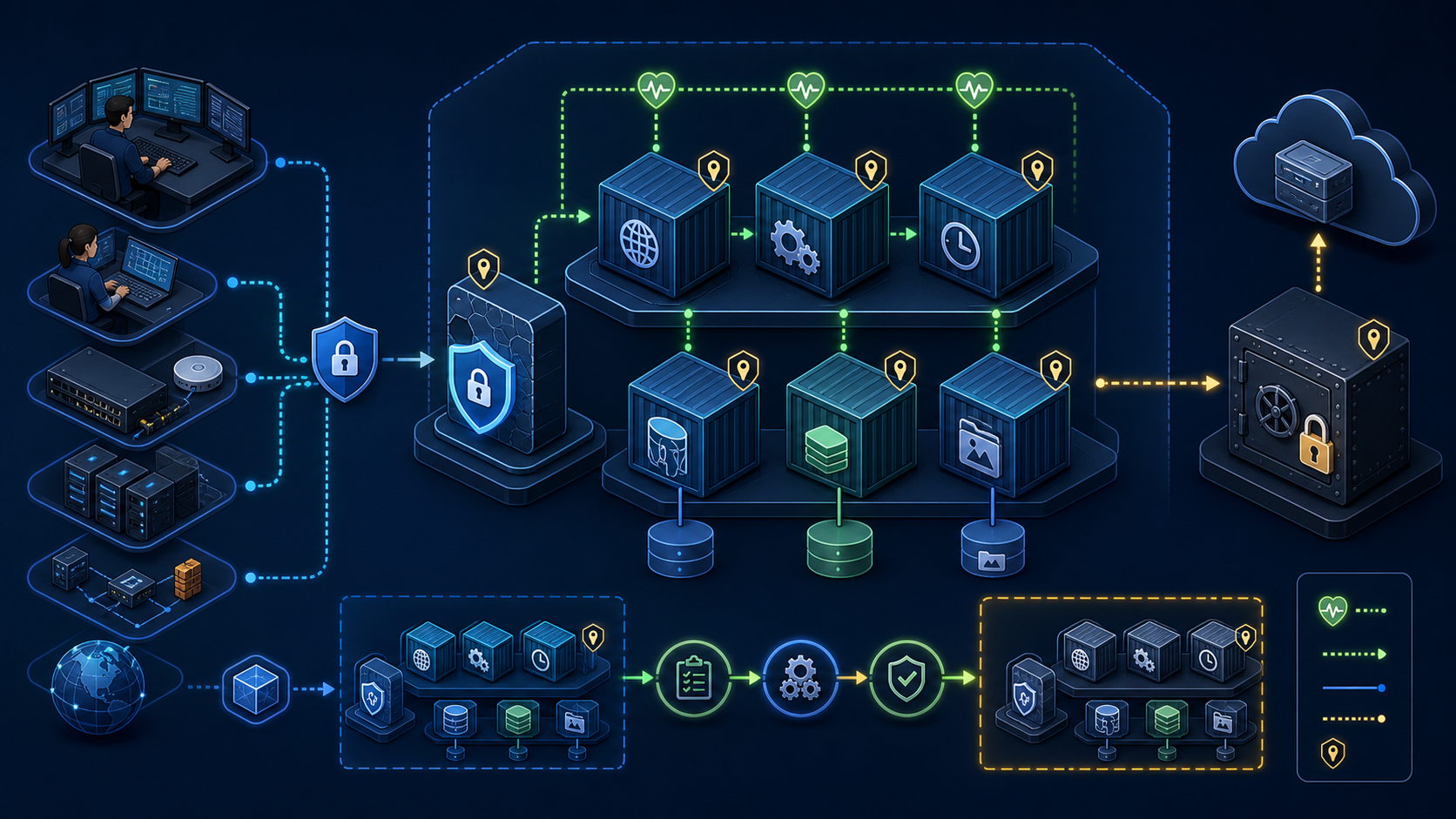
Components and Data Boundaries
| Component | Role | Persistence and exposure rules |
|---|---|---|
| netbox | Web UI and REST API application | Access only through the reverse proxy |
| netbox-worker | Background job processing | No external port required |
| PostgreSQL | NetBox’s authoritative data | Dedicated volume, no external exposure, and consistent backups |
| Valkey/Redis family | Cache and task queues | No external exposure; password and network restrictions |
| media volume | Uploaded images and attachments | Back up to the same recovery point as the database |
| TLS reverse proxy | HTTPS termination and access control | The only entry point that needs external exposure |
NetBox Docker is a separately maintained community project, not NetBox Community’s core installer itself. Choose it when the operations team can take responsibility for Docker, Compose, PostgreSQL recovery, and release notes.
Version Compatibility and Pinning
The NetBox Docker 5.0.1 release states compatibility with NetBox 4.6.x and later. Repository support files and image tags must match; updating only the repository or pulling latest images independently is insufficient. The official project recommends production tags containing both the NetBox version and support-file version.
Check Host Tool Versions
docker --version
docker compose version
git --version
openssl version
Pin the Repository Release to Validate
sudo install -d -o "$USER" -g "$USER" -m 0750 /opt/netbox
cd /opt/netbox
git clone --branch 5.0.1 --depth 1   https://github.com/netbox-community/netbox-docker.git netbox-docker-5.0.1
cd netbox-docker-5.0.1
git describe --tags --always
git status --short
Recheck the tag and compatibility range on the official release page at installation time. For long-term operation, pin an image tag containing the tested NetBox patch version, or use an image digest, and record it in change-management documentation.
Security Design Before Deployment
- Do not base new production deployments on CentOS 7, which is end of life.
- Do not publish database or cache ports to the host or external network.
- Initially bind NetBox only to 127.0.0.1 and serve it through an HTTPS proxy.
- Use actual FQDNs in ALLOWED_HOSTS rather than a wildcard.
- Create administrator accounts interactively and keep passwords out of Compose files and Git.
- Prepare a backup and restore runbook that recovers the database and media to the same point in time.
Deployment Directory Permissions
cd /opt/netbox/netbox-docker-5.0.1
umask 077
cp docker-compose.override.yml.example docker-compose.override.yml
chmod 0600 docker-compose.override.yml
find env -type f -exec chmod 0600 {} \;
Generate Strong Secrets
The example database/cache passwords and SECRET_KEY are publicly known. Before first startup, replace DB_PASSWORD, SECRET_KEY, API_TOKEN_PEPPER_1, REDIS_PASSWORD, and REDIS_CACHE_PASSWORD in env/netbox.env. Match POSTGRES_PASSWORD in env/postgres.env to DB_PASSWORD. Match REDIS_PASSWORD in env/redis.env and env/redis-cache.env to the task queue and cache passwords respectively. Editing environment files does not change the password in an existing database volume; that requires a separate procedure.
chmod 0700 env
${EDITOR:-vi} env/netbox.env env/postgres.env env/redis.env env/redis-cache.env
Set ALLOWED_HOSTS=netbox.example.internal localhost 127.0.0.1 and SKIP_SUPERUSER=true in the NetBox environment file, adapting the service name. Create the administrator later with the interactive command.
umask 077
openssl rand -base64 48
openssl rand -base64 32

# Store the generated values in an approved secret store or Compose secrets file
# and keep them out of shell history, Git, and ticket descriptions.
Check the selected release’s documentation for environment variable names and supported secrets mechanisms. Do not reuse the same value for SECRET_KEY, the PostgreSQL password, and cache passwords.
Compose Overrides and Network Exposure
Bind the web port to loopback during initial validation. The override below is a conceptual example; compare it with the example file in the 5.0.1 repository and inspect the merged configuration before use. Do not add ports entries to the database or cache services.
services:
  netbox:
    ports:
      - "127.0.0.1:8000:8080"
    restart: unless-stopped
Inspect the Merged Compose Configuration and Images
The repository’s default NetBox image uses a movable 4.6-series tag. Verify an exact patch/support-file combination in the official registry, then set VERSION in the project’s .env. This is the Compose interpolation file, distinct from each service’s env/*.env.
# Enter a tag whose existence and compatibility you have verified in the official registry.
# Example format: v4.6.<PATCH>-5.0.1; do not store the literal <PATCH> placeholder.
${EDITOR:-vi} .env
# .env contents: VERSION=<verified NetBox patch and support-file tag>

docker compose config --images
docker compose pull
For byte-identical redeployments, record RepoDigests from docker image inspect after pulling and pin each service’s image to a verified image@sha256:... value. Pinning the repository tag alone does not pin all image digests.
docker compose config --quiet
docker compose config --images
docker compose config > /tmp/netbox-compose.rendered.yml

# Check the output for latest tags, ports exposed on 0.0.0.0, and published database/cache ports
grep -nE 'latest|0\.0\.0\.0|5432:|6379:' /tmp/netbox-compose.rendered.yml
Rendered Compose files may contain secret values. Create review files with mode 0600, remove them safely after inspection, and do not attach them to CI logs or issues.
Pull Images and Start NetBox
Pull Images First and Record Digests
docker compose pull
docker compose images
docker image ls --digests | grep -E 'netbox|postgres|valkey'
docker compose config --images > deployed-images.txt
chmod 0600 deployed-images.txt
Start Services and Check Health
docker compose up -d
docker compose ps
docker compose logs --tail=200 netbox
docker compose logs --tail=100 netbox-worker
curl -fsS http://127.0.0.1:8000/ >/dev/null
A container being running does not mean the application is ready. Verify completed migrations, PostgreSQL connectivity, worker startup, HTTP responses, login, and a representative API query.
Initial Administrator and ALLOWED_HOSTS
Storing SUPERUSER_PASSWORD=admin in an environment file, as the original article did, can expose the password through container inspection, backups, Git history, or logs. After first startup, create an administrator interactively with the official management command. Remove any temporary SUPERUSER_* variables immediately afterward.
docker compose exec netbox /opt/netbox/netbox/manage.py createsuperuserSpecify the actual service FQDN in ALLOWED_HOSTS and match it to the Host header forwarded by the TLS proxy. Before external exposure, review HTTPS, trusted proxy headers, access controls, session cookie policy, and administrator MFA/SSO.
Back Up PostgreSQL and Media
PostgreSQL holds NetBox’s core authoritative data, while uploaded files reside in the media volume. A database dump alone omits images and attachments; a volume snapshot alone may not ensure PostgreSQL consistency. During the same change window, capture both assets with configuration and image inventories, then store them encrypted.
Create a Logical PostgreSQL Backup
BACKUP_DIR="/var/backups/netbox/$(date +%F-%H%M%S)"
sudo install -d -m 0700 "$BACKUP_DIR"
sudo chown "$USER":"$USER" "$BACKUP_DIR"

docker compose exec -T postgres   pg_dump -U netbox -d netbox -Fc   > "$BACKUP_DIR/netbox.pgdump"

docker compose exec -T postgres pg_restore --list < "$BACKUP_DIR/netbox.pgdump" | head
Find Actual Volume Names and Mount Points
docker compose config --volumes
docker volume ls
docker inspect "$(docker compose ps -q netbox)"   --format '{{json .Mounts}}' | jq .
Back up media using snapshots appropriate to the storage driver or an approved backup tool. For file-based copies, control concurrent writes and preserve permissions, ownership, and symbolic links. Transfer backups encrypted to a separate host and record checksums.
Generate Backup Integrity Checksums
cp docker-compose.override.yml "$BACKUP_DIR/"
cp deployed-images.txt "$BACKUP_DIR/"
# Restrict access to .env and env/ containing secrets, and include them in a separate encrypted backup.
(
  set -euo pipefail
  cd "$BACKUP_DIR"
  find . -type f ! -name SHA256SUMS -print0 | sort -z | xargs -0 sha256sum > SHA256SUMS
  sha256sum -c SHA256SUMS
)
A zero exit status does not prove a backup is recoverable. Regularly restore the database and media into an isolated staging Compose project and verify login, object counts, attachments, and API queries.
Upgrade NetBox Safely
An upgrade is more than git pull and replacing images with latest. Check release notes for compatibility among NetBox, NetBox Docker, PostgreSQL, and Valkey, including required intermediate versions. NetBox Docker 4.0.0 made major changes, including switching the application server to Granian and moving to PostgreSQL 18 and Valkey 9; an old deployment cannot safely adopt these through a simple restart.
- Record the current repository tag, image digests, NetBox version, and database version.
- Back up the database, media, and configuration, then restore them in an isolated environment.
- Check the supported upgrade path in target release notes and official update documentation.
- Prepare the target repository tag in a new directory and review local overrides before porting them.
- Validate merged Compose configuration, images, secrets, and ports, then run migrations in staging.
- Deploy during a production change window and verify UI, API, workers, logs, and data.
Record Current Application and Database Versions
git describe --tags --always
docker compose images
docker compose exec -T netbox   /opt/netbox/venv/bin/python /opt/netbox/netbox/manage.py version
docker compose exec -T postgres psql -U netbox -d netbox   -Atc 'select version();'
Validate the New Release Before Changing Production
docker compose config --quiet
docker compose pull
docker compose up -d
docker compose ps
docker compose logs --since=10m | grep -Ei 'error|traceback|failed'
After a schema migration, rolling back only the image may be unsafe. Unless a reverse migration is documented, restore the pre-change database, media, and configuration together when rollback is required.
Troubleshooting Sequence
| Symptom | Check first | Often-overlooked cause |
|---|---|---|
| Web interface unavailable | Proxy, loopback port, and NetBox logs | Proxy upstream, firewall, or Host header issues rather than missing port publication |
| netbox unhealthy | Migrations, database/cache connections, and secrets | Incompatible repository and image versions |
| Worker jobs stalled | Worker logs and cache state | Web service healthy while the worker repeatedly restarts |
| Errors after an upgrade | Release notes, database migrations, and plugins | Plugin incompatibility or a PostgreSQL major-version change |
| Missing attached images | Media volume mounts and permissions | Database restored without the media volume |
docker compose ps --all
docker compose logs --tail=300
docker compose config --images
docker compose exec -T netbox   /opt/netbox/netbox/manage.py check
docker stats --no-stream
Operations Checklist
- Pin the repository tag and every image version or digest in change-management records.
- Use the actual service FQDN in ALLOWED_HOSTS and leave database/cache ports unpublished.
- Keep administrator passwords and SECRET_KEY out of Git, rendered Compose files, and logs.
- Operate the TLS proxy, access controls, time synchronization, and regular security updates.
- Back up PostgreSQL, media, configuration, and image inventories as one recovery set.
- Regularly restore in isolation and test NetBox login, API access, and attachments.
- Before upgrades, review release notes, intermediate versions, and PostgreSQL, Valkey, and plugin compatibility.
Official Documentation and Related Articles
- Official NetBox Docker community repository
- NetBox Docker releases and compatibility
- NetBox Docker operations wiki
- Official NetBox upgrade documentation
- Official Docker Engine installation documentation
- Air-Gapped NetBox Bundle with Podman
Conclusion
A successful NetBox Docker deployment can reproduce its versions and recover its data, not merely start containers. Pin repository and images together, minimize exposure, separate secrets, create administrators interactively, use TLS, and back up the database and media together. Upgrade only after restore testing and release-specific compatibility validation.