Linux Kernel Architecture: Scheduling, Memory, VFS, Boot, and Troubleshooting
EdwardMoon
The Linux kernel is the core OS layer that lets applications safely share CPU, memory, disk, and network resources. Processes request services through the system call ABI rather than directly calling kernel functions. The kernel checks permissions and resource state before performing hardware operations.
This article goes beyond labeling Linux a monolithic kernel. Follow commands you can observe on a real server to connect scheduling, virtual memory, VFS, boot, modules, and panics. It also explains why diagnosis should come before applying unsupported sysctl recommendations.
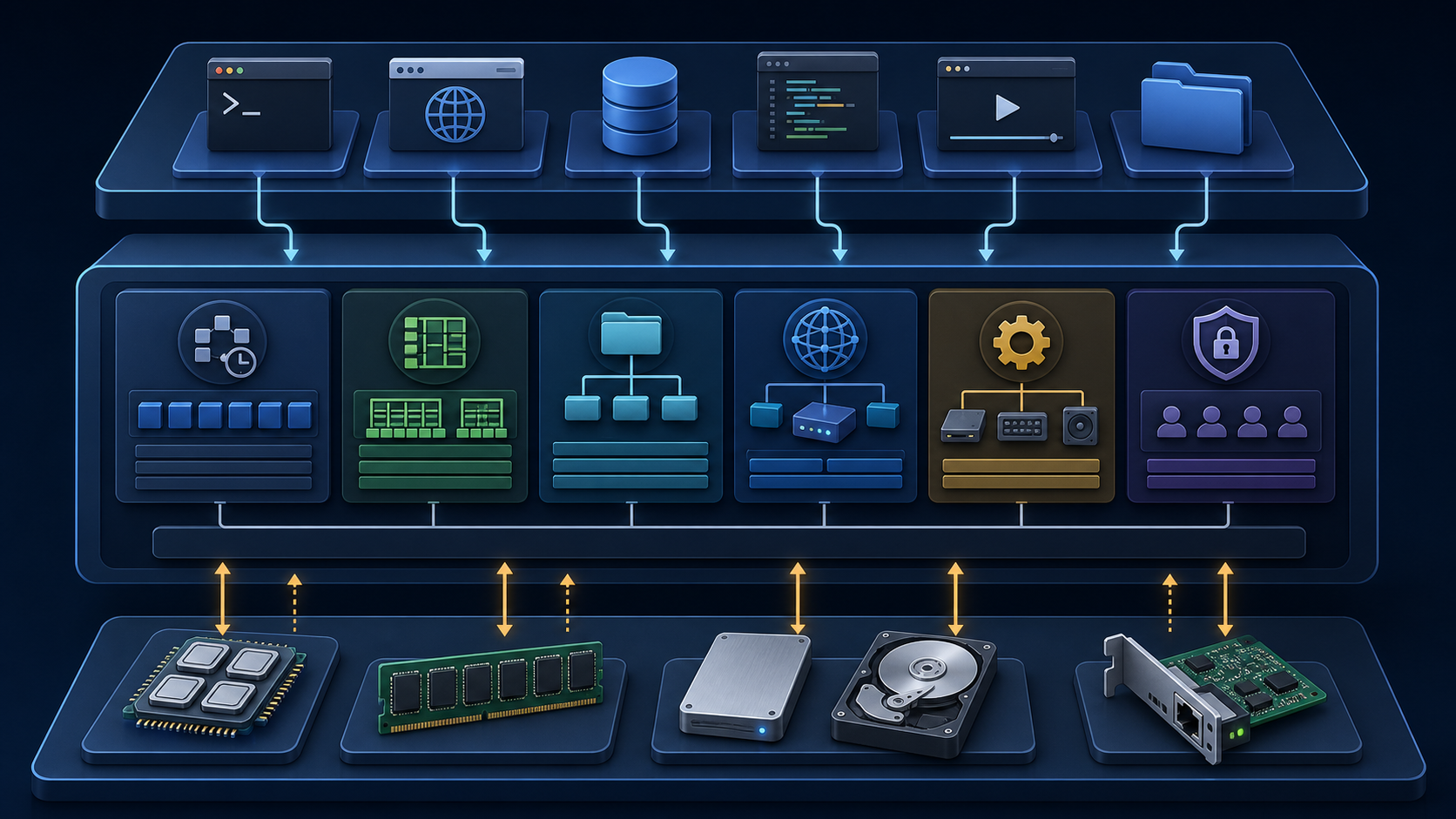
Linux Kernel Architecture at a Glance
Linux is a monolithic kernel: performance-critical components, including the scheduler, memory manager, VFS, network stack, and most drivers, run in kernel address space. It also supports loadable kernel modules that add or remove functionality at runtime. CPU privilege levels and page-table protections separate user space from kernel space.
| Layer | Typical components | How failures appear |
|---|---|---|
| User space | Shells, web servers, databases, libc | Process exits, latency, error codes |
| System call boundary | openat, read, write, mmap, clone | errno values such as EACCES, ENOMEM, and EIO |
| Kernel space | Scheduler, MM, VFS, networking, LSMs, drivers | Warnings, Oops messages, panics, resource pressure |
| Hardware | CPU, RAM, block devices, NICs | Machine checks, I/O errors, interrupt anomalies |
Identify the Running Kernel and Environment
uname -a
cat /etc/os-release
cat /proc/cmdline
systemd-detect-virt
cat /proc/sys/kernel/tainted
A nonzero final value may indicate a tainted kernel due to a proprietary module, forced module removal, hardware error, or another condition. Do not draw conclusions from the number alone; consult the official taint-bit definitions alongside the kernel logs.
Core Kernel Subsystems
| Subsystem | Role | Typical observation points |
|---|---|---|
| Scheduler | Decides when and on which CPU runnable tasks execute | ps, schedstat, perf sched |
| Memory management | Manages virtual addresses, page faults, page cache, reclaim, and NUMA policies | /proc/meminfo, vmstat |
| VFS | Provides a common file API and object model across filesystems | findmnt, stat, /proc/filesystems |
| Networking | Handles sockets, TCP/IP, routing, Netfilter, and device queues | ss, ip, nstat |
| Security | Controls access through DAC, capabilities, LSMs, seccomp, and related mechanisms | id, getcap, ausearch |
| Drivers | Discovers buses and devices and connects them to common kernel interfaces | lspci -k, lsmod, modinfo |
The System Call Boundary
Applications commonly use libc wrappers, but libc is not mandatory. They can invoke architecture-specific system call instructions and calling conventions directly. The kernel checks the system call number, arguments, and permissions before dispatching the implementation. It is therefore more accurate to say that glibc commonly provides convenient wrappers than that glibc handles system calls.
Trace File Opening with strace
strace -f -e trace=openat,read,write,close cat /etc/hostname

# Show summary statistics only
strace -c cat /etc/hostname
On modern glibc systems, opening a file may appear as an openat()-family call rather than open(). Do not assume a user-space function and the underlying system call always have the same name.
CFS and EEVDF Scheduling
Linux scheduling for ordinary tasks is preemptive; describing CFS as non-preemptive is incorrect. Starting with kernel 6.6, fair scheduling also began transitioning from CFS’s virtual-runtime selection model to EEVDF. Distribution backports can affect behavior, so consult the actual kernel version and vendor documentation rather than inferring behavior from a name alone.
uname -r
ps -eo pid,tid,psr,cls,pri,ni,stat,comm --sort=-pri | head -n 20
chrt -p $$
cat /proc/$$/sched | head -n 30
Note: Do not conflate CFS/EEVDF for ordinary tasks with the real-time policies SCHED_FIFO, SCHED_RR, or deadline scheduling. Incorrect real-time priorities can starve management shells and essential daemons; do not change them arbitrarily on production servers.
Virtual Memory and the Page Cache
A process’s virtual addresses map to physical memory or files through the MMU and page tables. Anonymous memory, file mappings, page cache, slab, reclaim, and swap interact. Do not diagnose memory exhaustion from the free column of free alone; examine available memory, swap, page faults, reclaim, and PSI together.
free -h
grep -E 'MemAvailable|Cached|Swap|Slab|SReclaimable' /proc/meminfo
vmstat 1 10
cat /proc/pressure/memory
ps -eo pid,comm,rss,vsz,%mem --sort=-rss | head -n 20
Inspect a Process’s Address Space
PID=1234
pmap -x "$PID" | tail -n 20
cat "/proc/$PID/status" | grep -E 'VmRSS|VmSwap|Threads'
cat "/proc/$PID/smaps_rollup"
VmRSS includes shared pages, so summing it across processes can overstate actual physical memory use. Use smaps_rollup when you need PSS, which apportions shared-page costs.
VFS and File I/O
VFS provides a common interface over implementations such as ext4, XFS, Btrfs, and NFS. Pathnames resolve to inodes through the dentry cache, and a process’s file descriptor table references kernel file objects for open files. These references explain why removing a pathname does not release its blocks while a process still holds the file open.
cat /proc/filesystems
findmnt -o TARGET,SOURCE,FSTYPE,OPTIONS
stat /var/log/messages
sudo lsof +L1
cat /proc/sys/fs/file-nr
Investigate disk space errors by distinguishing blocks, inodes, and deleted files that remain open. See the No space left on device troubleshooting guide for the detailed sequence.
Boot and initramfs
A typical UEFI system boots through firmware, a bootloader, the kernel and initramfs, the real root filesystem, and PID 1. Usually supplied as a compressed cpio archive, initramfs provides early user space. It prepares the modules and tools needed for storage, encryption, LVM, or RAID before switching to the real root filesystem.
- Firmware selects a boot entry and executes a bootloader or EFI stub.
- The kernel initializes CPUs, memory, interrupts, and early drivers.
- Early user space in initramfs prepares the real root device.
- After switch_root, PID 1 on the real root filesystem starts services and the login environment.
cat /proc/cmdline
systemd-analyze time
systemd-analyze critical-chain
journalctl -b -k -p warning

# Inspect the current initramfs on RHEL and Rocky Linux
lsinitrd "/boot/initramfs-$(uname -r).img" | less
Regenerating initramfs or changing GRUB can leave a system unbootable. For remote servers, secure console access, a previous kernel, bootable backups, and a recovery procedure before following the distribution’s documented process.
Diagnose Kernel Modules and Drivers
Modules run with high privileges inside the kernel, so their failures have a different impact from user programs. If a device is missing, inspect the device, its bound driver, module signatures, and kernel logs before unloading or reloading modules.
lspci -nnk
lsmod | head
modinfo <module_name>
journalctl -k -b | grep -Ei 'firmware|module|driver|taint|error'
cat /proc/sys/kernel/tainted
modprobe -r can detach active storage or network drivers. In production, do not run it until you have checked dependencies and impact, scheduled a maintenance window, and secured console access.
Diagnose a Kernel Panic
A kernel Oops may allow execution to continue after logging an error, but system reliability may already be compromised. A kernel panic means the kernel has determined that it cannot continue normal execution. Depending on configuration, it may halt, reboot after a timeout, or switch to a kdump capture kernel. It is not always simply a protective shutdown.
journalctl -k -b -1 -p warning..alert
last -x | head -n 20
sudo kdumpctl status
sysctl kernel.panic kernel.panic_on_oops
ls -lh /var/crash
Panic Investigation Procedure
- Identify recent kernel, driver, firmware, or hardware changes and their timing.
- Preserve the complete panic screen and first error from the console or remote management interface.
- If kdump was configured, collect vmcore and debug symbols for the exact kernel build.
- Compare behavior after booting the previous kernel to distinguish regressions from hardware problems.
- Do not deliberately trigger a panic on a production server.
sysctl: Measure, Form a Hypothesis, and Plan Rollback
sysctl --system and sysctl -p apply settings to the running kernel. They are not syntax checks or read-only diagnostic commands. Replace the file path below with an existing local configuration file. If a change is needed, apply it separately in a maintenance window after recording original values and preparing rollback commands.
There is no universal sysctl preset for every web server. Bottlenecks depend on the kernel version, memory, connection patterns, application queues, and container limits. Changing tcp_tw_reuse, port ranges, backlogs, and swappiness all at once without evidence only makes the cause harder to isolate.
# 1. Read current values and related metrics.
sysctl vm.swappiness net.core.somaxconn net.ipv4.ip_local_port_range
ss -s
vmstat 1 10

# 2. Inspect configuration files read-only; do not apply their values.
sudo find /etc/sysctl.d /run/sysctl.d /usr/local/lib/sysctl.d /usr/lib/sysctl.d \
  -maxdepth 1 -type f -name '*.conf' -print 2>/dev/null
sudo cat /etc/sysctl.conf

# 3. Select a file to review and compare its settings with current kernel values.
sudo cat /etc/sysctl.d/99-local.conf
sysctl vm.swappiness net.core.somaxconn net.ipv4.ip_local_port_range
These commands provide a framework for observing before and after a change, not recommended tuning values. Apply one production change at a time and record success criteria such as p95/p99 latency, error rates, retransmissions, and memory pressure, together with immediate rollback values.
A Ten-Minute Kernel Diagnostic Sequence
# 1. Version, boot, and taint state
uname -r
uptime
cat /proc/sys/kernel/tainted

# 2. CPU, memory, and I/O pressure
vmstat 1 10
cat /proc/pressure/{cpu,memory,io}

# 3. Recent kernel warnings and failed units
journalctl -k -b -p warning..alert
systemctl --failed

# 4. Filesystems and deleted files still open
df -hT
df -i
sudo lsof +L1
Diagnosis should not begin by changing tuning values. Align event timelines, determine which resource is saturated, establish whether kernel warnings or application errors came first, and then form a reproducible hypothesis.
Common Misconceptions Corrected
| Misleading claim | Accurate explanation |
|---|---|
| CFS is a non-preemptive scheduler | Ordinary Linux task scheduling is preemptive, and the EEVDF transition began with 6.6. |
| glibc handles system calls | libc commonly supplies wrappers; the kernel performs the privilege transition and actual processing. |
| Low free memory means memory exhaustion | Consider available memory, reclaim, swap, PSI, and workload metrics together. |
| A panic always shuts the system down immediately | Halting, rebooting, and dump capture depend on panic timeout and kdump settings. |
| The same recommended sysctl values suit every server | Measure for the kernel, hardware, and traffic involved, then validate changes individually. |
Official Documentation and Further Reading
- Linux EEVDF scheduler documentation
- Linux memory management documentation
- Linux VFS overview
- Linux /proc/sys/kernel documentation
- Linux kdump documentation
- Isolating Python Environments in User Space
Conclusion
Understanding Linux kernel architecture means connecting user-space symptoms to system calls, scheduling, memory, VFS, and drivers, rather than merely memorizing terms. Preserve version information and logs first, use observed metrics to narrow down the bottleneck, and validate one change at a time with a rollback plan.