Slurm from Installation to Operations: HPC Resource Management and Job Scheduling
EdwardMoon
Deploying Slurm takes more than installing packages. Align clocks and UIDs/GIDs across all nodes, establish a MUNGE trust domain, then configure the slurmctld controller, slurmd compute nodes, and optional slurmdbd accounting service in order.
This guide connects production role separation, packaging, slurm.conf, cgroup resource isolation, job accounting, submission and validation, draining, and backups. Replace example node names and resources with the actual output of slurmd -C.
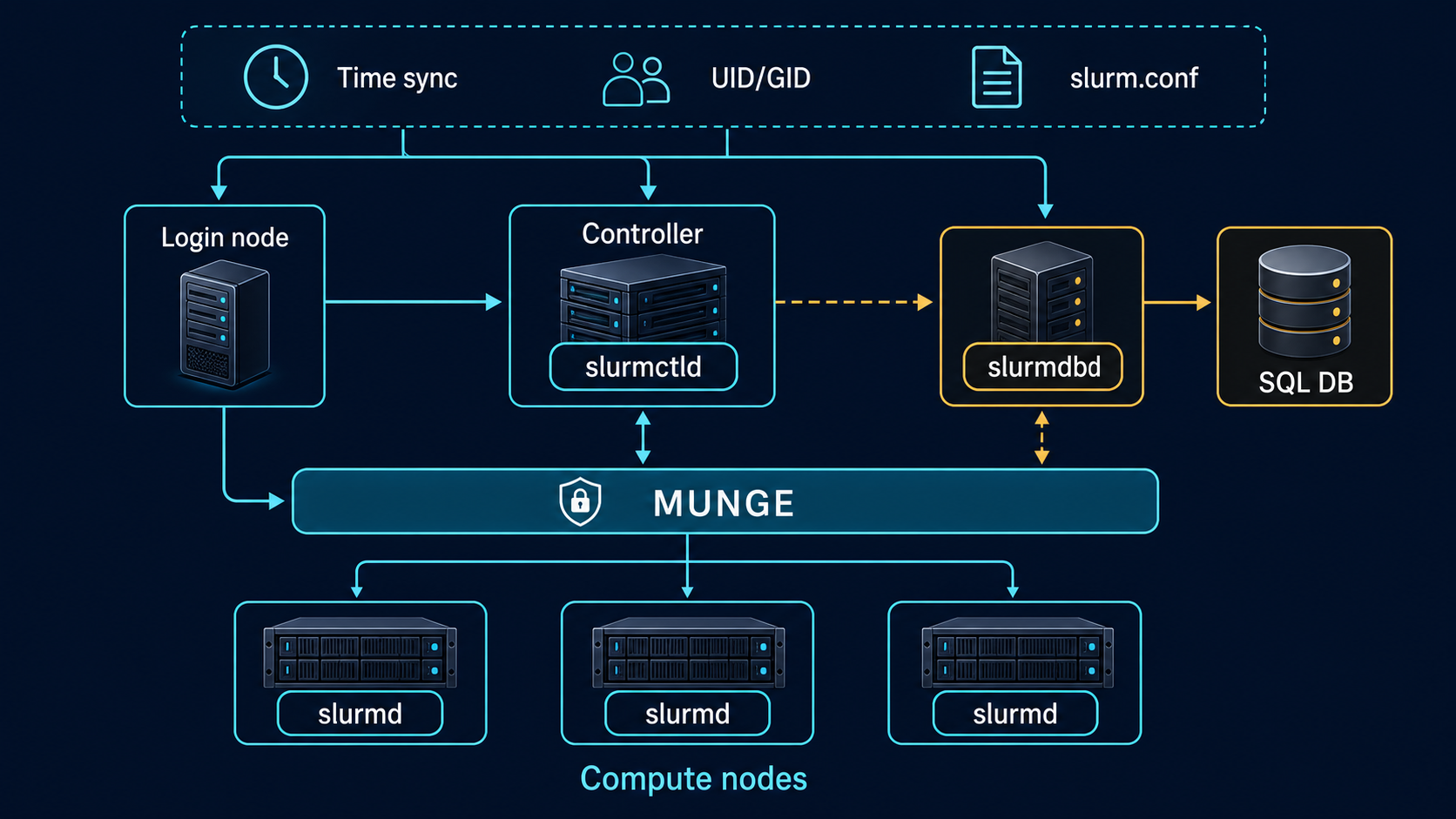
Terminology: Slurm accounting collects, stores, and queries job execution history and allocated or consumed resources. Here, job accounting refers to those records, not financial bookkeeping.
Roles and Failure Boundaries
| Component | Role | Operational priorities |
|---|---|---|
| slurmctld | Scheduling and cluster state | Protect StateSaveLocation and design HA |
| slurmd | Executes jobs on compute nodes | Local spool and cgroup isolation |
| MUNGE | Credentials between nodes | Identical keys, accurate time, and strict permissions |
| slurmdbd | Mediates database storage and queries for job/resource records | Protect database secrets and backups; handle failures separately |
| slurmrestd | Optional REST API | No direct internet exposure; separate authentication and proxy |
The Slurm controller does not store compute data itself, but it does hold scheduler state. Do not respond to failures by deleting StateSaveLocation or activating two controllers independently.
Node, Time, and UID/GID Prerequisites
Forward/reverse name resolution, matching numeric user IDs, and NTP synchronization must be correct for consistent MUNGE authentication and job ownership. Without a central directory such as LDAP, pin numeric IDs through account provisioning.
hostnamectl --static
getent hosts ctrl01
getent hosts node01
id slurm
id hpcuser
timedatectl status
chronyc tracking
chronyc sources -v
Service Accounts and Directories
sudo groupadd --system slurm
sudo useradd --system --gid slurm   --home-dir /var/lib/slurm --shell /sbin/nologin slurm
sudo install -d -o slurm -g slurm -m 0750 /var/lib/slurm/controller
sudo install -d -o root -g root -m 0755 /var/lib/slurm
sudo install -d -o root -g root -m 0755 /var/lib/slurm/slurmd
sudo install -d -o slurm -g slurm -m 0750 /var/log/slurm
Creating accounts independently on multiple nodes can produce different UIDs/GIDs. Pin numeric IDs to organizational standards or supply them through a central directory.
SlurmdSpoolDir is managed by root on compute nodes, but job users must be able to traverse it to execute scripts. Create it as root:root with mode 0755, distinct from the controller state directory’s slurm:slurm 0750. Check that the parent /var/lib/slurm is also 0755.
Prepare Reproducible Slurm Packages
For production, build RPM or DEB packages from official release tarballs and pin them in an internally signed repository instead of repeatedly running make install from source directories. Keep Slurm major/minor versions and plugin build options consistent across controllers, login nodes, and compute nodes.
sha256sum "${SLURM_TARBALL}"
rpmbuild -ta "${SLURM_TARBALL}"
rpm -qp --queryformat '%{NAME} %{VERSION}-%{RELEASE}
'   ~/rpmbuild/RPMS/*/slurm-*.rpm
Determine build dependencies for your distribution, database, PMIx, hwloc, and cgroup support using official documentation and the internal support matrix. Do not install an arbitrary internet repository package on just one controller.
Install Build Results by Role
rpmbuild does not install packages. Prepare plugin dependencies before building: MUNGE development libraries, hwloc/libbpf/D-Bus for cgroup v2, and MySQL/MariaDB development libraries for accounting, as needed. Publish RPMs from the same version to an internal repository, then install the following packages by role. Verify that the repository contains your tested build and inspect candidate versions first.
# Check candidate versions and their source in the internal repository
dnf info slurm slurm-perlapi slurm-slurmctld slurm-slurmd slurm-slurmdbd
# ctrl01
sudo dnf install slurm slurm-perlapi slurm-slurmctld
# On each compute node, node01 through node04
sudo dnf install slurm slurm-perlapi slurm-slurmd
# On the login node
sudo dnf install slurm slurm-perlapi
# On acct01 when persistent job accounting is enabled
sudo dnf install slurm slurm-slurmdbd
Configure the MUNGE Trust Domain
Distribute the same MUNGE key to every participating node in a cluster. Transfer it through a secure configuration-management channel and allow only the munge user to read it. Start MUNGE before Slurm.
sudo /usr/sbin/mungekey --create
sudo chown munge:munge /etc/munge/munge.key
sudo chmod 0400 /etc/munge/munge.key
sudo systemctl enable --now munge
munge -n | unmunge
After securely distributing the controller-generated key, compare ownership and hashes on all nodes. Never print the key contents on a command line or in ordinary logs.
sudo stat -c '%U:%G %a %n' /etc/munge/munge.key
sudo sha256sum /etc/munge/munge.key
remunge
Generate slurm.conf from Actual Hardware
Do not guess CPUs, sockets, cores, or memory. Run slurmd -C on every compute node and define NodeName groups for matching hardware models.
slurmd -C
lscpu
free -m
lsblk -o NAME,SIZE,TYPE,MOUNTPOINTS
ClusterName=hpc-prod
SlurmctldHost=ctrl01
SlurmUser=slurm
StateSaveLocation=/var/lib/slurm/controller
SlurmdSpoolDir=/var/lib/slurm/slurmd
SlurmctldLogFile=/var/log/slurm/slurmctld.log
SlurmdLogFile=/var/log/slurm/slurmd.log
AuthType=auth/munge
SelectType=select/cons_tres
SelectTypeParameters=CR_Core_Memory
SchedulerType=sched/backfill
ProctrackType=proctrack/cgroup
TaskPlugin=task/cgroup
AccountingStorageType=accounting_storage/slurmdbd
AccountingStorageHost=acct01
JobAcctGatherType=jobacct_gather/cgroup
NodeName=node[01-04] CPUs=32 RealMemory=125000 State=UNKNOWN
PartitionName=compute Nodes=node[01-04] Default=YES MaxTime=2-00:00:00 State=UPThe NodeName CPUs and RealMemory values are examples. Set memory slightly below the actual slurmd -C value to leave headroom for the OS. For GPUs, separately validate GRES and device cgroup configuration.
Resource Isolation with cgroup v2
Save the following to cgroup.conf beside slurm.conf, and distribute slurm.conf consistently to all participating nodes. If persistent accounting is not ready, omit or comment out both AccountingStorageType and AccountingStorageHost. Current Slurm disables persistent accounting by leaving AccountingStorageType unset, rather than selecting the removed accounting_storage/none plugin. In that case, defer sacct and sacctmgr steps until slurmdbd and the database are configured.
CgroupPlugin=autodetect
ConstrainCores=yes
ConstrainRAMSpace=yes
ConstrainDevices=yes
stat -fc %T /sys/fs/cgroup
scontrol show config | grep -E 'ProctrackType|TaskPlugin|SelectType'
systemd-cgls --no-pagerPersistent Job Accounting with slurmdbd
Use slurmdbd and a supported SQL database for long-term job history, usage by Slurm account, and QoS management. Depending on scale, place SQL on a separate host.
This example places slurmdbd and a supported MariaDB/MySQL server together on acct01. Prepare the database installation, InnoDB support, and backup policy first. In a database administrator session, create slurm_acct_db and a slurm SQL account restricted to that database. Enter the real password through the approved administration procedure, not shell arguments or recorded files. If SQL is on another host, update StorageHost and the database account’s permitted connection host together.
-- Example SQL to run in a database administrator session
CREATE DATABASE slurm_acct_db;
CREATE USER 'slurm'@'localhost' IDENTIFIED BY 'REPLACE_WITH_UNIQUE_SECRET';
GRANT ALL ON slurm_acct_db.* TO 'slurm'@'localhost';
SHOW ENGINES;
Save these settings to /etc/slurm/slurmdbd.conf and replace StoragePass with the SQL account’s real password. The SQL user and OS slurm user are separate accounts. Do not start the service with an empty configuration or example password.
AuthType=auth/munge
DbdHost=acct01
DbdPort=6819
SlurmUser=slurm
StorageType=accounting_storage/mysql
StorageHost=localhost
StorageUser=slurm
StoragePass=REPLACE_WITH_UNIQUE_SECRET
StorageLoc=slurm_acct_db
LogFile=/var/log/slurm/slurmdbd.log
PidFile=/var/run/slurmdbd.pid
Keep database credentials in a mode-0600 slurmdbd.conf or a secret-management system, never in published text or Git.
# Back up any existing file first. Do not overwrite it with an empty file.
sudo install -d -m 0755 /etc/slurm
sudo touch /etc/slurm/slurmdbd.conf
sudo chown slurm:slurm /etc/slurm/slurmdbd.conf
sudo chmod 0600 /etc/slurm/slurmdbd.conf
sudoedit /etc/slurm/slurmdbd.conf
sudo systemctl enable --now slurmdbd
sudo journalctl -u slurmdbd -b --no-pager
Register the cluster and create Slurm accounts and user associations through change management. A Slurm account groups resource usage by project or organization; it is distinct from an OS login account. An association links a cluster, Slurm account, user, and optional partition. Preserve sacctmgr output and database backups, and identify deletion targets through read-only inspection before executing destructive commands.
sudo sacctmgr add cluster hpc-prod
sudo sacctmgr add account research Description='Research'
sudo sacctmgr add user hpcuser Account=research
sacctmgr show cluster
sacctmgr show association tree
Service Startup Order and Status Checks
- Verify clocks, name resolution, and UIDs/GIDs on every node.
- Start MUNGE and test credentials locally and remotely.
- If accounting is enabled, verify slurmdbd and database connectivity first.
- Start slurmctld on the controller.
- Start slurmd on compute nodes.
- Inspect configuration and node state with scontrol and sinfo.
# Run only on controller ctrl01
sudo systemctl enable --now slurmctld
# Run the following command on every compute node
sudo systemctl enable --now slurmd
systemctl --no-pager --full status slurmctld
systemctl --no-pager --full status slurmd
scontrol ping
sinfo --long
scontrol show nodes
Validate with Interactive and Batch Jobs
srun --partition=compute --nodes=1 --ntasks=1   hostname
srun --partition=compute --nodes=2 --ntasks-per-node=2   /bin/hostname
#!/usr/bin/env bash
#SBATCH --job-name=smoke-test
#SBATCH --partition=compute
#SBATCH --nodes=2
#SBATCH --ntasks-per-node=2
#SBATCH --time=00:05:00
#SBATCH --output=slurm-%j.out
set -euo pipefail
hostname
srun --label /bin/hostnameJOB_ID=$(sbatch --parsable smoke-test.sbatch)
squeue --job "$JOB_ID"
sacct --jobs "$JOB_ID" --format=JobID,State,Elapsed,AllocCPUS,MaxRSS,ExitCode
scontrol show job "$JOB_ID"Drain Nodes and Recover Safely
sudo scontrol update NodeName=node03   State=DRAIN Reason='planned maintenance'
scontrol show node node03
squeue --nodelist=node03

sudo scontrol update NodeName=node03 State=RESUME
sinfo --nodes=node03 --long
Do not blindly RESUME nodes in DOWN or DRAIN state. Inspect Reason, slurmd logs, hardware events, and filesystem state first. For nodes with running jobs, decide whether to wait, requeue, or cancel according to policy.
sudo journalctl -u slurmd --since '-30 minutes' --no-pager
sudo journalctl -u slurmctld --since '-30 minutes' --no-pager
scontrol show node node03
sdiag
Backup and Recovery
- Version-control slurm.conf, cgroup.conf, gres.conf, and deployment automation sources.
- Back up StateSaveLocation with service consistency in mind and preserve its permissions.
- Back up the slurmdbd database transaction-consistently and test restoration.
- Store the MUNGE key separately in an encrypted secret store and audit access.
- Configure the standby controller through Slurm’s official HA mechanism and keep its slurmctld daemon running. Maintain one active scheduler and let Slurm coordinate standby promotion and failback. Do not run two independent primary controllers against the same state.
Official Documentation and Related Guides
- SchedMD: slurm.conf and SlurmdSpoolDir permissions
- SchedMD: Job accounting database configuration
- SchedMD: Required slurmdbd.conf settings
- SchedMD: Slurm Administrator Quick Start
- SchedMD: slurm.conf configurator
- SchedMD: cgroup v2 guide
- Rocky Linux Installation and Initial Security
- SSH Key Authentication and Management Account Security
A complete Slurm deployment passes MUNGE authentication, resource isolation, multi-node jobs, accounting, drain/resume, and backup/restore tests; active daemons alone are insufficient. Automate these checks and repeat them when adding nodes or upgrading versions.