Upgrade Rocky Linux 8.8 to 8.10 Safely
EdwardMoon
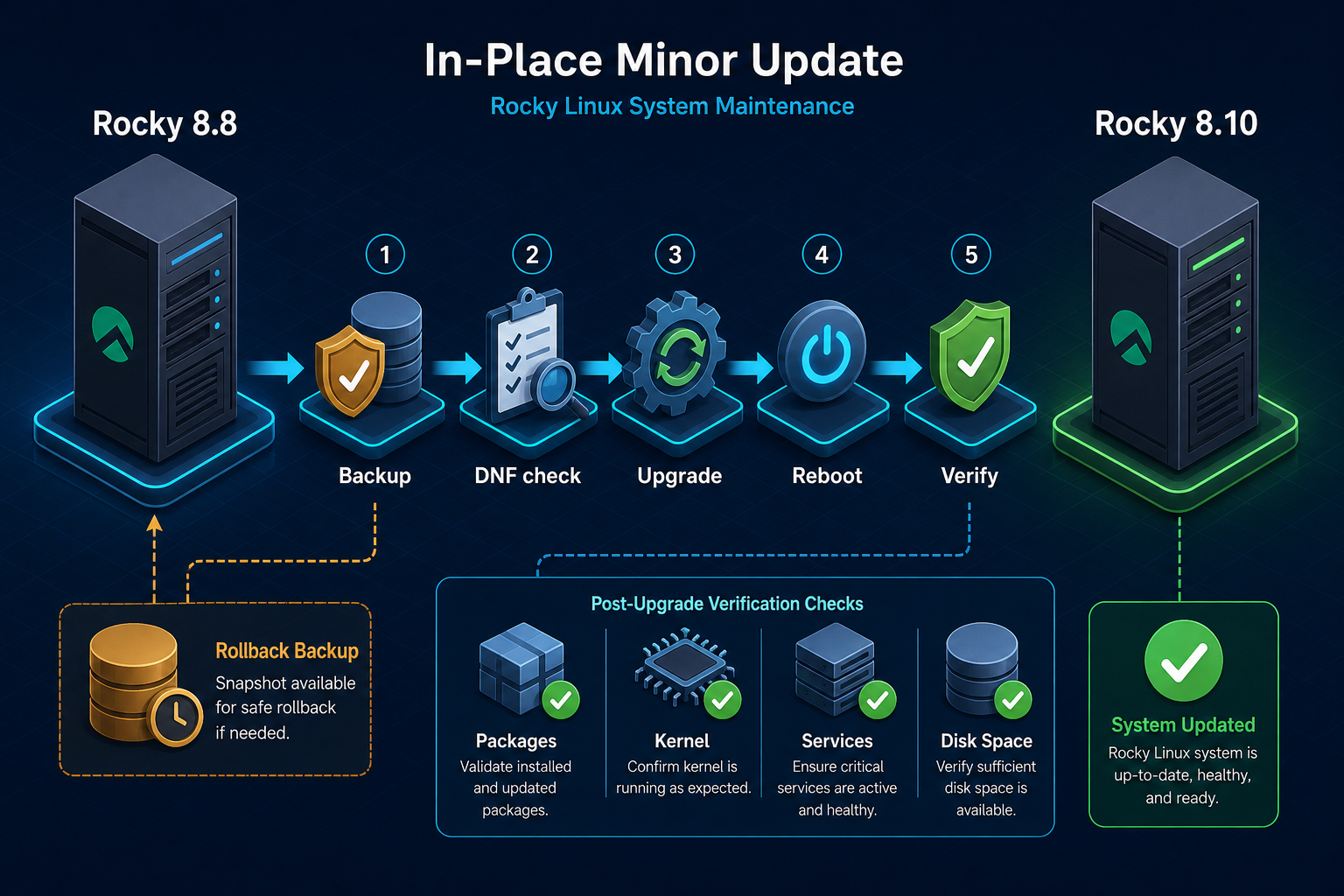
Upgrading to Rocky Linux 8.10 means synchronizing packages with current 8.x repositories, rebooting, and validating services. Rocky Linux 8.8 is an unsupported minor release; 8.10 is the final minor release of Rocky Linux 8. Before touching production, establish backups, console access, external repository checks, and recovery criteria rather than relying on a single package command.
This procedure covers an upgrade from 8.8 to 8.10 within the same major version. It is not a major-version upgrade or a CentOS 7 migration. Check application and database compatibility, reproduce the procedure on a matching clone or staging server, then apply it to production.
Check Support Status Before Upgrading
Rocky Linux’s official version table lists 8.10 as the final Rocky Linux 8 minor release, with major-version support ending May 31, 2029. Previous minor releases leave support and move to Vault when a new minor release appears. Pinning a server to 8.8 is not a security maintenance strategy.
| Check | Pass criteria | Stop condition |
|---|---|---|
| Host role | Inventory of services, ports, and dependencies | Unknown owner or acceptable downtime |
| Recovery options | Tested backups and console access | Snapshots exist but restoration has not been tested |
| Repositories | Primarily official Rocky BaseOS and AppStream | Enabled external repositories with unclear signatures |
| Capacity | Free space and inodes on root, /var, and /boot | Insufficient room to install a kernel |
| Applications | Confirmed support for 8.10 | Unclear driver or agent compatibility |
Step 1: Preserve the Baseline and Create a Recovery Point
Do not rely solely on a VM snapshot. Make an independent, consistent backup of application data before upgrading. Use the database product’s supported logical or physical backup procedure, and record restore-test results and expected recovery time.
sudo install -d -m 0700 /root/pre-rocky-8-10
sudo cp -a /etc/yum.repos.d /root/pre-rocky-8-10/
sudo rpm -qa --qf '%{NAME} %{EPOCHNUM}:%{VERSION}-%{RELEASE}.%{ARCH}\n'   | sort | sudo tee /root/pre-rocky-8-10/packages.txt >/dev/null
sudo systemctl list-unit-files --state=enabled   | sudo tee /root/pre-rocky-8-10/enabled-units.txt >/dev/null
sudo ss -lntup | sudo tee /root/pre-rocky-8-10/listeners.txt >/dev/null
sudo find /root/pre-rocky-8-10 -maxdepth 1 -type f -name '*.txt' -exec sha256sum {} \;
Step 2: Run Pre-Upgrade Diagnostics
cat /etc/rocky-release
uname -r
sudo dnf repolist --enabled
sudo dnf check
sudo rpm --verify --all | sudo tee /root/pre-rocky-8-10/rpm-verify.txt >/dev/null

findmnt -T /
df -hT / /var /boot
df -i / /var /boot
sudo systemctl --failed --no-pager
Review package verification results to distinguish intentional configuration changes from corruption. Do not overwrite files simply because verification produces output. Check vendor support particularly for kernel modules, security products, HBA/NIC drivers, and packages from private repositories.
Why Temporarily Separate External Repositories?
ELRepo, EPEL, database, and security-agent repositories can affect dependency resolution. Do not delete required repositories indiscriminately. Record their state, verify supplier support for Rocky Linux 8.10, and selectively disable unvalidated repositories during the update window.
sudo dnf repolist --all
sudo grep -RHE '^[[]|^enabled=|^baseurl=|^mirrorlist=|^metalink='   /etc/yum.repos.d/*.repo

# Example: temporarily disable only unverified repositories
sudo dnf install dnf-plugins-core
sudo dnf config-manager --set-disabled example-third-party
sudo dnf clean all
sudo dnf makecache
Step 3: Perform the Upgrade
Standard Rocky Linux 8 repositories provide the current minor release of major version 8. The normal approach is to update all packages with a valid repository configuration, without arbitrarily pinning releasever or mixing RPMs manually.
sudo dnf upgrade --refresh
sudo dnf check
sudo dnf needs-restarting -r
# 0: no reboot required; 1: reboot required. Distinguish these from tool execution errors.
sudo reboot
Read the package removal/replacement list before confirming the transaction. Use --allowerasing sparingly, only when you understand the conflict and the removals are safe; it is not a default option for hiding problems.
Step 4: Verify the Version and Kernel After Reboot
cat /etc/rocky-release
uname -r
rpm -q rocky-release rocky-repos rocky-gpg-keys
sudo dnf check
sudo dnf check-update || rc=$?
test "${rc:-0}" -eq 0 -o "${rc:-0}" -eq 100

sudo systemctl --failed --no-pager
sudo journalctl -p err -b --no-pager
sudo ss -lntup
getenforce
An 8.10 release string alone does not complete the upgrade. Confirm the system booted the new kernel, no systemd units failed, and ports, logs, and SELinux mode match the baseline. Test actual service transactions, such as HTTP requests, database reads/writes, and message processing.
Step 5: Resolve DNF Conflicts Safely
sudo dnf repoquery --duplicates
sudo dnf repoquery --unsatisfied
sudo dnf list --extras
sudo dnf distro-sync --assumeno
sudo dnf history info last
Before applying dnf distro-sync or --allowerasing, review proposed removals and verify the recovery point. If many core components would be removed, resolve mixed repositories or module-stream conflicts first.
Step 6: Review /boot Space and Old Kernels
df -hT /boot
rpm -q kernel-core
grubby --default-kernel
sudo dnf remove --oldinstallonly --setopt installonly_limit=3 --assumeno
Keep the running kernel and the previous known-good kernel. Review a simulated removal transaction before executing it, and check bootloader entries and remote console access.
Step 7: Set Rollback Criteria
DNF transaction history is useful for diagnosis, but it is not a complete rollback mechanism for a platform update that changes the kernel, glibc, and systemd together. If the system cannot boot, critical data is damaged, or an unsupported driver is found, stop further changes and restore a verified image or backup.
sudo dnf history list
sudo dnf history info last
sudo journalctl -b -1 -p warning --no-pager
sudo tar -C /root/pre-rocky-8-10 -czf /root/pre-rocky-8-10-evidence.tgz .
Operations Checklist
- Record change approval, the responsible operator, and the maintenance window.
- Verify console access and tested backup restoration.
- Check external repository and module-stream compatibility.
- Save the proposed DNF transaction.
- Reboot into the new kernel after updating.
- Verify service transactions and monitoring.
- After the observation period, remove temporary snapshots and backups according to policy.
Official Resources and Related Articles
- Rocky Linux versions and support lifecycle
- Rocky Linux 8.10 release notes
- Managing RHEL 8 security updates
- Linux Disk Space and Inode Troubleshooting
- Migrating from CentOS 7 to Rocky Linux 8
Conclusion
A safe Rocky Linux 8.10 upgrade connects preflight checks, a complete update from official Rocky 8 repositories, rebooting, and real service validation. Pinning 8.8 or using Vault does not replace security support. Verify external repository and driver compatibility and a tested recovery point before moving to 8.10.