Migrate CentOS 7 to Rocky Linux 8: A Rebuild-First Guide
EdwardMoon
For a CentOS 7 to Rocky Linux migration, this guide recommends building a new Rocky Linux 8.10 server and moving applications and data in stages. CentOS Linux 7 reached end of life on June 30, 2024 and no longer receives security updates. Pointing a production server at Vault does not restore support.
The current official ELevate guide directs users to explicitly supported migration paths. Avoid assuming an unverified in-place conversion supports Rocky Linux as its destination. If the destination is absent from the tool’s current support matrix, choose a rebuild and data migration. Any exceptional in-place conversion should first be reproduced on a separate clone.
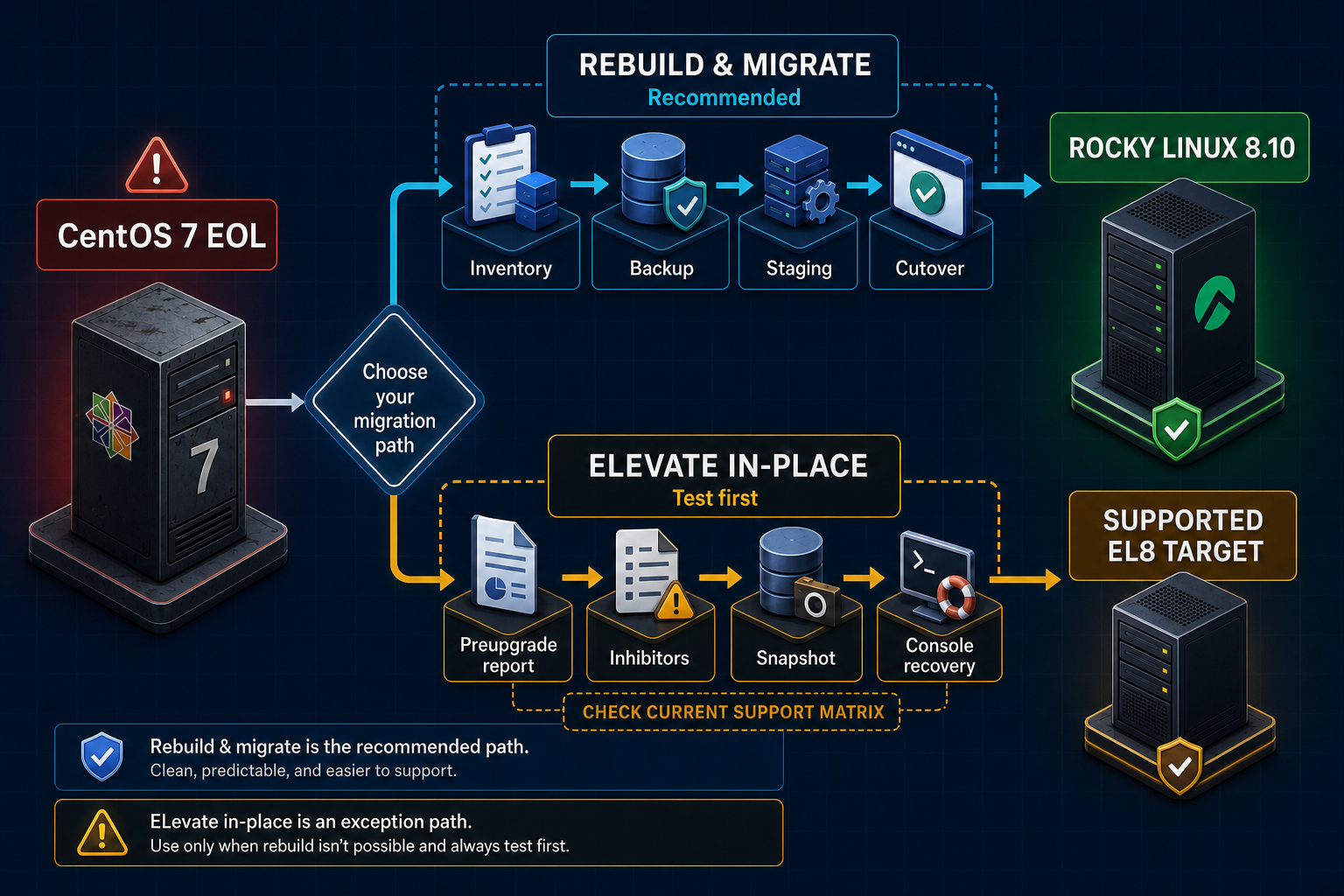
Recommended Migration Approach
| Path | Recommendation | Key conditions |
|---|---|---|
| Build Rocky 8.10 and migrate | Recommended | Clean OS, clear rollback, and staged validation |
| In-place tool | Exception | Verify currently supported destinations, inhibitors, and recovery console access |
| Keep running CentOS 7 | Not recommended | Security risk outside isolated, short-term recovery |
Step 1: Inventory CentOS 7 Assets and Dependencies
sudo install -d -m 0700 /root/migration-inventory
cat /etc/centos-release | sudo tee /root/migration-inventory/release.txt
uname -r | sudo tee /root/migration-inventory/kernel.txt
sudo rpm -qa --qf '%{NAME}|%{VERSION}-%{RELEASE}|%{ARCH}\n'   | sort | sudo tee /root/migration-inventory/packages.txt >/dev/null
sudo systemctl list-unit-files --state=enabled   | sudo tee /root/migration-inventory/enabled-units.txt >/dev/null
sudo ss -lntup | sudo tee /root/migration-inventory/listeners.txt >/dev/null
sudo crontab -l 2>/dev/null | sudo tee /root/migration-inventory/root-crontab.txt >/dev/null
A package comparison is not enough. Work with service owners to inventory systemd overrides, certificates, firewall rules, custom SELinux policies, cron jobs, account UIDs/GIDs, database character sets, external storage, and monitoring agents.
Network and Security Baseline
ip -br address
ip route
sudo firewall-cmd --list-all-zones
getenforce
sudo semanage port -l | sudo tee /root/migration-inventory/selinux-ports.txt >/dev/null
sudo getsebool -a | sudo tee /root/migration-inventory/selinux-booleans.txt >/dev/null
sudo find /etc/systemd/system -type f -print   | sort | sudo tee /root/migration-inventory/systemd-local-files.txt >/dev/null
Step 2: Back Up and Test Restoration
Create consistent backups for each service. For databases, use supported dump or backup tools rather than copying live files. Preserve access permissions for encryption keys and certificates separately.
sudo install -d -m 0700 /backup
sudo tar --xattrs --acls --selinux -C /   -czf /backup/centos7-etc-home-$(date +%F).tgz etc home
sudo find /backup -maxdepth 1 -type f -name 'centos7-etc-home-*.tgz' -exec sha256sum {} \; | sudo tee /backup/SHA256SUMS >/dev/null

# PostgreSQL example: validate against the official restore procedure for your version
set -o pipefail
sudo -u postgres pg_dumpall --clean --if-exists | sudo tee "/backup/postgresql-all-$(date +%F).sql" >/dev/null
Creating backup files does not prove recovery works. Treat a backup as a rollback option only after restoring it on an isolated test server and passing application transaction tests.
Step 3: Build the Rocky Linux Target
Verify the Rocky Linux 8.10 ISO checksum and install a minimal package set. Configure the new server’s hostname, time synchronization, DNS, storage performance, and SELinux Enforcing state before adding application repositories.
cat /etc/rocky-release
sudo dnf upgrade --refresh -y
sudo systemctl --failed --no-pager
timedatectl status
chronyc tracking
getenforce
sudo firewall-cmd --state
df -hT
df -i
Step 4: Migrate Configuration Selectively
Overwriting Rocky Linux 8’s entire /etc with CentOS 7’s files can break PAM, crypto policies, systemd, and networking. Compare application configuration with the new defaults and remove directives that are no longer supported.
diff -u /srv/migration/old/app.conf /etc/example/app.conf || true
sudo rsync -aHAXn --numeric-ids   /srv/migration/app-data/ /var/lib/example/

# Perform the actual copy only after reviewing the dry run
sudo rsync -aHAX --numeric-ids   /srv/migration/app-data/ /var/lib/example/
sudo restorecon -RFv /var/lib/example
Step 5: Synchronize Data and Minimize Downtime
Move data through an initial full copy, incremental synchronization, a final write freeze, and a final sync. If using database replication or logical dumps, verify support for the source and target major-version combination.
# Initial file-data synchronization: dry-run first
sudo rsync -aHAXn --delete --numeric-ids   /srv/app-data/ rocky8:/srv/app-data/

# Perform the initial synchronization after approval
sudo rsync -aHAX --delete --numeric-ids   /srv/app-data/ rocky8:/srv/app-data/

# Final cutover window: stop application writes, then synchronize remaining changes
sudo systemctl stop example-app
sudo rsync -aHAX --delete --numeric-ids   /srv/app-data/ rocky8:/srv/app-data/
Step 6: Test Functionality and Performance Before Cutover
curl --fail --silent --show-error https://staging.example.com/health
openssl s_client -connect staging.example.com:443   -servername staging.example.com -verify_return_error </dev/null
ssh rocky8 'systemctl --failed --no-pager'
ssh rocky8 'journalctl -p err -b --no-pager'
ssh rocky8 'ss -lntup'
ssh rocky8 'getenforce'
Test login, reads and writes, batch jobs, backups, monitoring, alerts, and performance through real user workflows. Network reachability alone is not sufficient validation.
Step 7: Cut Over DNS or the Load Balancer and Plan Rollback
dig +short app.example.com
curl --resolve app.example.com:443:192.0.2.80   --fail --silent --show-error https://app.example.com/health

# Verify DNS and certificates after cutover
dig +trace app.example.com
openssl s_client -connect app.example.com:443   -servername app.example.com -verify_return_error </dev/null
Lower TTLs in advance and preserve the old server with writes disabled instead of deleting it immediately. Record measurable failure criteria and the latest rollback time in the change plan. Once the new server accepts writes, simply reverting DNS can lose recent data. Before rollback, stop writes on both sides and verify that new changes can be transferred consistently to the old server. Do not reopen the old server for writes unless reverse replication or data transfer has been validated.
When to Consider an In-Place Upgrade
Use tools such as ELevate only when all preupgrade inhibitors are resolved and the source/destination combination appears in the current support matrix. Documentation describing an AlmaLinux destination does not establish support for conversion to Rocky Linux.
# For exceptional paths, obtain actual commands from current official documentation
cat /etc/centos-release
sudo yum repolist enabled
sudo rpm -Va | sudo tee /root/preupgrade-rpm-verify.txt >/dev/null
findmnt -T /
df -hT / /var /boot
df -i / /var /boot
Approve an in-place path only after rehearsing the complete process on a separate clone and verifying boot, applications, and backup restoration. Do not manufacture an unsupported Rocky destination by replacing arbitrary packages.
Migration Validation Checklist
- Record CentOS 7 end-of-life risk in the change history.
- Collect assets, dependencies, UIDs/GIDs, and the security baseline.
- Restore backups in an isolated environment.
- Build and update a new Rocky Linux 8.10 server.
- Migrate selected configuration and data.
- Test real transactions and performance.
- Execute DNS/LB cutover with measurable rollback criteria.
- After the observation period, block access to and retire CentOS 7.
Official Resources and Related Articles
- Official CentOS Linux end-of-life notice
- Rocky Linux versions and support lifecycle
- Official AlmaLinux ELevate migration paths
- Rocky Linux 8.10 Upgrade Procedure
- CentOS 7 Vault Emergency Recovery Guide
Conclusion
The most predictable CentOS 7 to Rocky Linux migration builds a fresh Rocky Linux 8.10 environment and connects tested backups, selective configuration migration, data synchronization, service validation, and rollback. Vault does not extend CentOS 7 support, and an in-place path should never be assumed without a current support-matrix entry.