Configure CentOS 7 Vault for EOL Recovery and Migration
EdwardMoon
CentOS 7 Vault is a read-only archive of the final packages for the end-of-life CentOS Linux 7.9.2009 release. It can temporarily support data recovery and migration preparation on systems whose mirror lists no longer work. It provides neither new security updates nor ongoing operational support.
CentOS Linux 7 reached end of life on June 30, 2024. Do not keep an internet-facing production server running simply by changing its repository URLs to Vault. Isolate the host, collect required backups and inventories, and migrate to a supported Linux distribution.
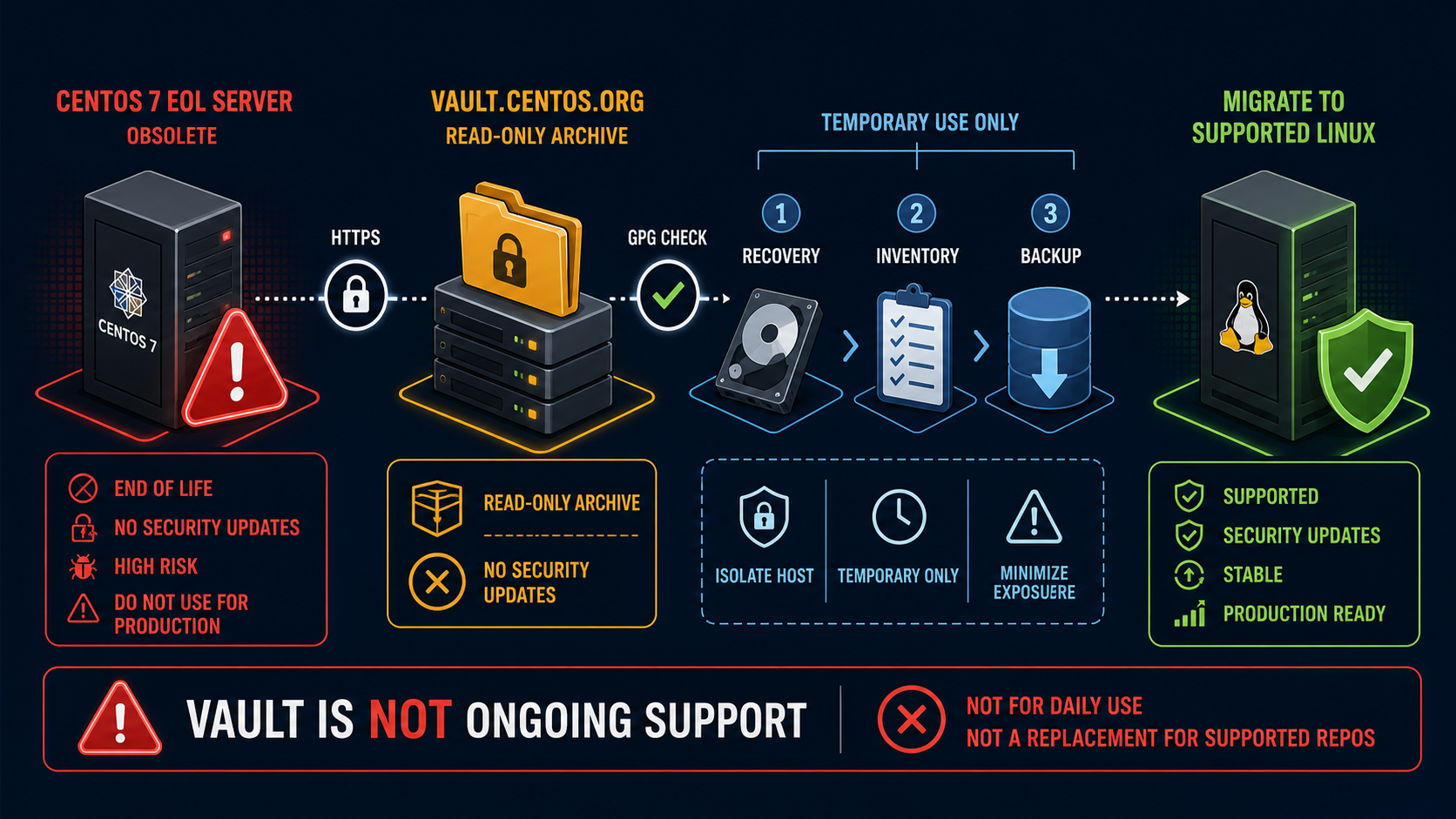
Appropriate Uses of CentOS 7 Vault
| Situation | Assessment | Action |
|---|---|---|
| Isolated server needing backup tools | Short-term use | Verify Vault, then back up immediately |
| Package and dependency inventory | Short-term use | Save results, then migrate |
| Internet-facing production server | Not acceptable | Isolate or move to a supported OS |
| Expecting security patches | Not available | Use a supported distribution |
Step 1: Isolate and Back Up Before Using Vault
cat /etc/centos-release
uname -r
sudo install -d -m 0700 /root/repo-backup
sudo cp -a /etc/yum.repos.d /root/repo-backup/
sudo rpm -qa --qf '%{NAME}|%{VERSION}-%{RELEASE}|%{ARCH}\n'   | sort | sudo tee /root/repo-backup/packages.txt >/dev/null
sudo sha256sum /root/repo-backup/packages.txt
Minimize external exposure through firewall or security-group rules and secure console access before changing repositories. Save repository files, package inventories, and service state so changes during recovery can be traced.
Step 2: Disable Existing Mirror Configuration
sudo grep -RHE '^[[]|^enabled=|^baseurl=|^mirrorlist=|^metalink='   /etc/yum.repos.d/*.repo
sudo mkdir -p /etc/yum.repos.d/disabled
sudo mv /etc/yum.repos.d/CentOS-*.repo   /etc/yum.repos.d/disabled/
Do not use a wildcard to move repository files belonging to other suppliers. Review the exact target list before executing commands, and handle private or agent repositories according to their owners’ migration plans.
Step 3: Create the Vault Repository File
sudo tee /etc/yum.repos.d/CentOS-Vault-7.9.2009.repo >/dev/null <<'REPO'
[base]
name=CentOS-7.9.2009 - Base - Vault
baseurl=https://vault.centos.org/7.9.2009/os/$basearch/
enabled=1
gpgcheck=1
gpgkey=file:///etc/pki/rpm-gpg/RPM-GPG-KEY-CentOS-7

[updates]
name=CentOS-7.9.2009 - Updates - Vault
baseurl=https://vault.centos.org/7.9.2009/updates/$basearch/
enabled=1
gpgcheck=1
gpgkey=file:///etc/pki/rpm-gpg/RPM-GPG-KEY-CentOS-7

[extras]
name=CentOS-7.9.2009 - Extras - Vault
baseurl=https://vault.centos.org/7.9.2009/extras/$basearch/
enabled=1
gpgcheck=1
gpgkey=file:///etc/pki/rpm-gpg/RPM-GPG-KEY-CentOS-7
REPO
7.9.2009 is the final CentOS Linux 7 release tree. Do not bypass errors by disabling GPG checks, forcing HTTP, or installing unknown RPMs directly.
Step 4: Verify HTTPS and Repository Metadata
curl --proto '=https' --tlsv1.2 --fail --head   https://vault.centos.org/7.9.2009/os/x86_64/repodata/repomd.xml

sudo yum clean all
sudo rm -rf /var/cache/yum
sudo yum makecache
sudo yum repolist enabled
sudo yum repoinfo base updates extras
Step 5: Verify the GPG Key
rpm -qf /etc/pki/rpm-gpg/RPM-GPG-KEY-CentOS-7
KEYCHECK_DIR=$(mktemp -d)
chmod 0700 "$KEYCHECK_DIR"
gpg --homedir "$KEYCHECK_DIR" --import /etc/pki/rpm-gpg/RPM-GPG-KEY-CentOS-7
gpg --homedir "$KEYCHECK_DIR" --fingerprint
# Compare with the official fingerprint. Use only a private GPG keyring in a temporary directory.

sudo yum install yum-utils
VAULT_CHECK_DIR=$(mktemp -d)
cd "$VAULT_CHECK_DIR"
yumdownloader --destdir . centos-release
rpm --checksig --verbose ./*.rpm
The presence of a GPG key file does not establish trust. Check its ownership by the existing centos-release package and compare the official fingerprint. Keep signature verification enabled for downloaded RPMs.
Step 6: Perform Only Required Recovery Work
# Review target packages and dependencies before installation
sudo yum install --assumeno rsync tar

# Install only approved recovery tools
sudo yum install rsync tar

sudo yum history info last
sudo rpm -Va | sudo tee /root/repo-backup/rpm-verify-after.txt >/dev/null
Vault’s final packages do not fix vulnerabilities discovered after end of life. Install only the minimum recovery tools and shorten the migration window, rather than performing a broad update to keep the system running long term.
Step 7: Collect Migration Information
sudo systemctl list-unit-files --state=enabled   | sudo tee /root/repo-backup/enabled-units.txt >/dev/null
sudo ss -lntup | sudo tee /root/repo-backup/listeners.txt >/dev/null
sudo firewall-cmd --list-all-zones   | sudo tee /root/repo-backup/firewalld.txt >/dev/null
getenforce | sudo tee /root/repo-backup/selinux-mode.txt >/dev/null
sudo find /etc/systemd/system -type f -print   | sudo tee /root/repo-backup/systemd-local-files.txt >/dev/null
sudo tar -C /root -czf /root/centos7-migration-inventory.tgz repo-backup
Step 8: Troubleshoot Access
Could not resolve host
getent ahosts vault.centos.org
cat /etc/resolv.conf
ip route
curl --fail --head https://vault.centos.org/
SSL certificate problem
date -u
timedatectl status
rpm -q ca-certificates
trust list --filter=ca-anchors
openssl s_client -connect vault.centos.org:443   -servername vault.centos.org -verify_return_error </dev/null
Check time, DNS, proxies, and the CA chain in order. Do not disable TLS verification or permanently enable curl’s insecure option.
404 or Metadata Errors
sudo yum repolist -v
sudo grep -RHE '^baseurl=|^mirrorlist=|^metalink='   /etc/yum.repos.d/*.repo
curl --fail --head   https://vault.centos.org/7.9.2009/updates/x86_64/repodata/repomd.xml
Step 9: Retire Vault After Migration
sudo yum-config-manager --disable base updates extras
sudo mv /etc/yum.repos.d/CentOS-Vault-7.9.2009.repo   /etc/yum.repos.d/disabled/
sudo yum clean all
Disable the Vault configuration when it is no longer needed and record the end time in the supported-OS migration record. Block writes on the old CentOS 7 server and retire it under organizational disposal procedures after the retention period.
Official Resources and Related Articles
- Official CentOS Linux end-of-life notice
- CentOS project end-date announcement
- Official 7.9.2009 package archive
- Migrate CentOS 7 to Rocky Linux 8
- Linux Disk Space and Inode Troubleshooting
Conclusion
CentOS 7 Vault archives the final CentOS 7 packages; it is not a security update channel for end-of-life servers. Isolate the host, verify repositories, GPG signatures, and HTTPS, and obtain only the recovery tools and migration information needed. Move to a supported environment such as Rocky Linux as soon as possible.